
How to Evaluate a CNC Woodworking ATC Router for Cabinet and Panel Production
How to Evaluate a CNC Woodworking ATC Router for Cabinet and Panel Production
For technical evaluators in cabinet and panel production, choosing the right CNC woodworking ATC router is rarely about the brochure headline. The real question is whether the machine will stay accurate under daily nesting loads, swap tools without wasting seconds all shift long, and keep panel quality stable when order mix gets messy. In cabinet work, especially with batch-one or small-batch customization, a machine that looks strong on paper can still become a bottleneck if dust extraction is weak, tool magazine logic is clumsy, or drilling and routing transitions are not tuned for panel flow.
A good evaluation process should feel closer to a factory walk-through than a spec-sheet comparison. You are checking whether the CNC woodworking ATC system fits your actual board sizes, material mix, software chain, and operator habits. That is where most bad buying decisions start: the machine is judged as a standalone asset, while production really experiences it as one station inside a larger digital and material-handling system.
Start with the workpiece, not the machine
Before comparing spindles, ask a simpler question: what exactly will this router cut all week? Full-sheet nesting for carcass panels is one thing. Mixed production with grooves, hidden connectors, hinge holes, lock slots, and occasional shaped fronts is another. If your shop runs MDF, plywood, particleboard, melamine-faced board, and moisture-resistant panels in the same schedule, the machine has to cope with different chip behavior, edge conditions, and hold-down requirements.
It helps to prepare a short evaluation pack before any demo:
- Your top 20 recurring part types
- The thickest and thinnest boards you actually run
- Typical daily sheet count and peak shift load
- Required hole patterns, groove depths, and edge quality expectations
- Any downstream constraints from edge banding, sorting, labeling, or assembly
Without this, the vendor will naturally show the machine in its easiest scenario.
Check whether the machine frame is built for repeatability
On cabinet parts, repeatability matters more than dramatic top speed claims. A frame that vibrates, a gantry that loses composure during direction changes, or a table that does not stay flat under vacuum load will show up as chipped edges, shifting hole positions, and fitting problems at assembly.
Ask how the machine bed is manufactured and stress-relieved, but do not stop there. Watch the router cut nested parts with dense hole groups near the sheet edge, then check the finished pieces physically. If the vendor only talks about acceleration and spindle power but avoids finished-part tolerance discussion, that is a warning sign. Formal tolerance acceptance should be agreed according to your own product requirements, because not every supplier presents it the same way and some values need customer-side confirmation【待核实】.
Also inspect the guideways, drive system, and cable management. In real production, fine dust and board debris are not minor details. They decide how gracefully the machine ages.
Do not over-focus on spindle power
Many buyers still get pulled toward a bigger spindle as if it automatically means better productivity. In panel furniture work, spindle selection matters, but the wrong conclusion is common. A CNC woodworking ATC router earns its keep through stable process windows: clean cutting, acceptable tool life, low downtime, and predictable changeovers.
What you should really check:
- Is the spindle matched to your board types and cutter diameters?
- Can it maintain stable performance in continuous nesting rather than short demo runs?
- What is the cooling method, and how is maintenance handled?
- Are vibration and noise levels acceptable at realistic feed settings?
If you cut mostly melamine-faced board, edge condition and breakout control can matter more than raw cutting aggression. That brings tooling, vacuum, feed optimization, and spoilboard condition into the picture immediately.
ATC performance is about logic, not just speed
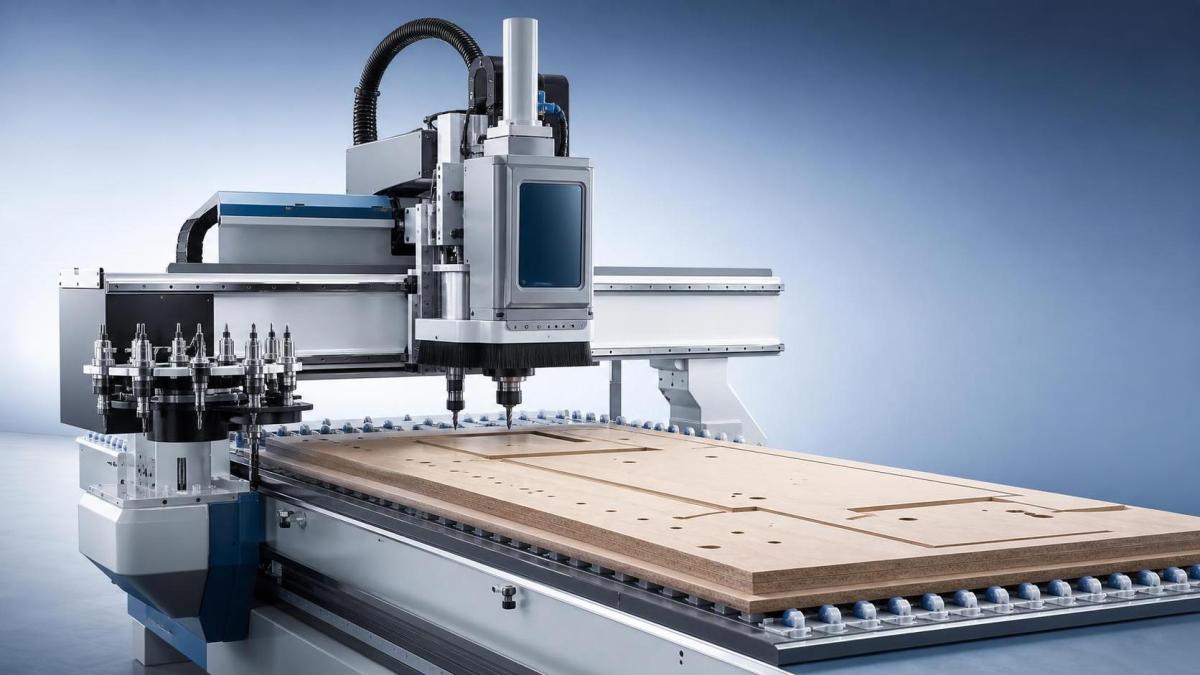
Every supplier will mention automatic tool changing. Fewer will show you what happens when the job requires several drill sizes, a grooving cutter, compression tools, and occasional special bits in one mixed production queue. Tool change time is only one part of the story. Tool magazine layout, change reliability, tool length calibration, and software handling of tool calls are what determine whether the ATC function actually saves time.
During evaluation, look for awkward moments. Does the machine make excessive travel to fetch tools? Does it require too much manual checking after a tool replacement? How are broken or worn tools flagged? If the machine relies on manual discipline for every tool-length issue, the production risk rises fast once shifts become busy.
For cabinet and panel production, I would rather take a slightly slower but reliable ATC cycle over a faster sequence that occasionally misloads a tool. Recovery time after one error can wipe out a shift’s supposed efficiency gain.
Vacuum table performance deserves a hard look
Poor hold-down is one of the most expensive hidden problems in nesting. It causes part movement, poor edge finish, recuts, and operator workarounds that eventually become normal practice. On small cabinet parts and narrow strips, this issue shows up quickly.
Check the zoning design of the vacuum table and ask for a live test using your smallest common parts, not only large rectangular panels. Watch what happens near the end of the sheet, when cut-through reduces vacuum stability. If pods, auxiliary fixtures, or process compromises are always needed, you need to know that before the purchase decision, not after installation.
Dust extraction also affects hold-down more than many buyers expect. Fine debris trapped on the table surface can reduce sealing quality and repeatability over time.
Drilling capability should match cabinet hardware reality
A router used for cabinets is not just a cutting center. It is also a drilling platform, and bad drilling capability causes immediate pain downstream. Confirm whether the machine configuration handles the horizontal and vertical drilling patterns you actually use for hinges, connectors, shelf pins, dowels, cams, and line boring. Some machines look versatile until you analyze how many repositioning steps they need for a normal cabinet side panel.
This is where software and head configuration interact. A technically capable drilling unit is far less useful if programming it is awkward or if the post-processor keeps producing inefficient sequences.
Software integration is often the deal-breaker
For whole-house customization and short-run panel work, the machine is only as smooth as the digital chain feeding it. Ask exactly how design data moves from CAD or cabinet design software into CAM, nesting, labeling, machine code, and downstream sorting. “Compatible” is too vague. You want to see the path on a real job file.
Key checks include post-processor maturity, barcode or QR-code workflow, tool library management, remnant handling, and error recovery. If your plant already uses MES or plans to, ask what data the machine can return: alarms, runtime, job status, maintenance prompts, and part completion records. Some vendors speak confidently about Industry 4.0 connectivity, but the useful level of integration varies a lot and should be verified against your own architecture【待核实】.
Cycle time claims need a full-shift view
A fast demo is not the same as a productive shift. When comparing suppliers, ask them to break cycle time into real components: loading, referencing, routing, drilling, tool changing, labeling, unloading, scrap handling, and operator intervention. The machine with the best headline traverse speed may still lose on actual output if its idle motions are inefficient or if small parts need constant manual rescue.
Try to estimate output by shift, not by isolated sheet. Cabinet production lives on consistency. One machine that calmly runs predictable sheets all day is usually easier to plan around than one that looks spectacular for ten minutes and then slows down once complexity rises.
Look past the machine to the support structure
In technical evaluations, after-sales support is sometimes treated as a commercial topic. It is not. It is part of machine availability. Ask where spare parts are stocked, what the remote diagnostics capability is, who handles installation, and how software updates are delivered. If the supplier cannot explain escalation paths clearly, downtime risk is already visible.
Training depth matters too. Operators need more than a startup session. For a CNC woodworking ATC router in a customization-heavy environment, training should cover tooling strategy, spoilboard management, nesting logic, error recovery, and basic preventive maintenance. Otherwise the machine may technically perform, but production never reaches the expected level.
A practical short list before you sign off
- Run your own representative part mix, not a vendor-selected sample.
- Inspect finished panels for hole position, edge breakout, and fit-up, not just machine motion.
- Confirm ATC reliability across a mixed tool set.
- Test small-part hold-down and late-sheet stability.
- Check software handoff from design to machine with a real production file.
- Review service response, parts supply, and operator training in writing.
- Ask what assumptions sit behind any productivity promise.
If there is one recurring mistake in CNC router selection for cabinet production, it is buying around isolated specifications. The better decision usually comes from matching machine behavior to your panel flow, your software reality, and your tolerance for downtime. Evaluate the CNC woodworking ATC router as a production system, and weak points tend to show themselves early enough to avoid an expensive surprise later.
Related News
Get weekly intelligence in your inbox.
No noise. No sponsored content. Pure intelligence.