
How Digital Print Integration for Cartons Improves SKU Flexibility and Changeover Speed
Start with the real bottleneck: where SKU changes are actually costing you time
Project managers usually hear the same promise around digital print integration for cartons: more flexibility, less downtime, easier short runs. That can be true. It can also turn into an expensive partial fix if the team never maps where changeover time is really going.
Before you look at presses, RIPs, workflow software, or feeder upgrades, break the changeover into parts. How long is spent on artwork release? Job file preparation? Plate changes on legacy processes? Color matching? Substrate swap? die-cut setup? folder-gluer adjustment? operator approval? pallet identification? If most of the delay sits upstream in approvals and file readiness, a new print engine alone will not give you the speed you are expecting.
A useful check is simple: compare the time from final artwork approval to first sellable carton, then compare that with the mechanical print-only setup time. In many plants, the hidden delay is not the act of printing. It is disconnected data between prepress, print, and converting.
Check whether your SKU mix really fits digital carton printing
Not every carton program benefits in the same way. The strongest fit tends to be high-mix, version-heavy work: seasonal variants, regional language changes, retailer-specific graphics, promotional packs, test launches, and frequent artwork refreshes. If your plant is still dominated by long, stable runs with minimal versioning, the value case will look different.
Ask these questions early:
- How many active SKUs share the same structural carton but require different graphics?
- How often do artwork revisions happen after planning is already frozen?
- How many jobs are short enough that conventional setup waste feels disproportionate?
- How often do sales teams request urgent inserts, market tests, or country variants?
If those problems show up every week, integrated digital printing has a practical role. If they only appear once in a while, the project may need a narrower scope, such as handling only versioned SKUs or late-stage promotional work.
Do not evaluate print in isolation from converting
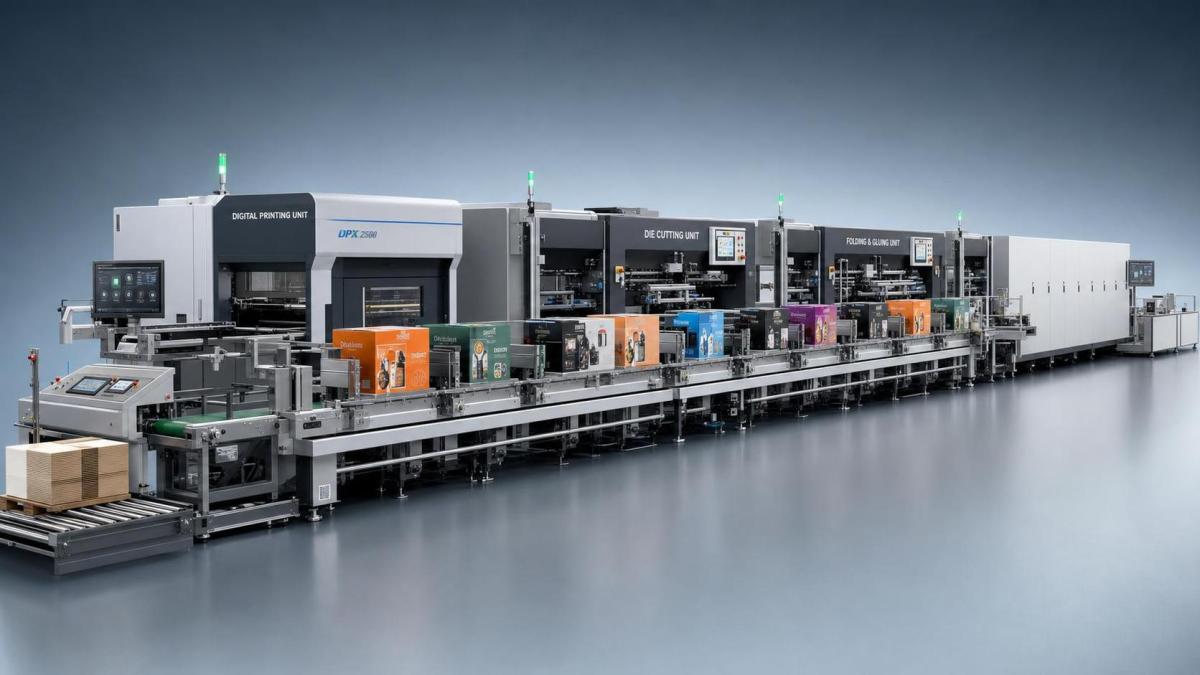
This is where many carton projects lose momentum. The print team celebrates faster job switching, but the die-cutter or folder-gluer becomes the new queue. For project managers, that means the integration plan should follow the whole carton path, not just the print module.
A digitally printed carton still needs to register properly in downstream converting. So check whether the workflow can pass the right job identity, repeat length, orientation, and print-to-cut reference consistently. Even when the graphics side changes quickly, structural setup may still dominate if the carton formats vary too much.
One common mistake is to count every SKU as a separate setup burden. In practice, some SKU families can be grouped if the board grade, carton dimensions, and converting layout stay the same. That is where integration pays off: graphics change without forcing a full physical reset every time.
Make the artwork workflow part of the project scope
When people say they want faster changeovers, they often mean they want fewer last-minute surprises. That only happens when the digital front end is connected to a disciplined artwork process.
At minimum, check these handoff points:
- Who owns the approved master file?
- How are barcode, language, legal panel, and version codes controlled?
- Is there a clear rule for file naming and revision status?
- Can the press workflow reject the wrong revision before production starts?
If the answer to that last question is no, your changeover speed can improve while your reprint risk gets worse. Version errors are expensive because they often look like a packaging problem when the real issue is document control.
Decide how much color control you actually need job to job
For many SKU programs, speed matters only if brand appearance remains stable. That does not mean every digital carton line needs the same color strategy, but it does mean you should define the acceptable tolerance before installation and acceptance planning.
The practical question is not “Can this engine print well?” It is “Can this workflow reproduce the required brand appearance across reruns, substrates, and shifts without forcing long operator intervention?” If operators spend too much time manually correcting files or chasing approvals at press side, your nominally fast changeover slows down again.
For project teams handling regulated or highly brand-sensitive cartons, the right check is to align prepress, print, and QA on one approval path: target reference, proof expectation, substrate condition, and release authority. Without that, disputes move downstream and consume capacity.
Watch the substrate range before promising universal flexibility
SKU flexibility sounds broad, but carton plants know the details matter. Coated board, uncoated stock, liner variations, surface smoothness, moisture behavior, and converting requirements all affect how useful digital integration will be on the floor.
A sensible review looks at the job families you are trying to move, not a generic material list. Which board types generate the most version changes? Which ones create print hold-ups or drying concerns? Which ones later see cracking, scuffing, or glue-related issues after printing? The best project scopes start with a realistic material window and expand only after production learning is stable.
This is also where cross-functional silence becomes costly. Print may accept a substrate that converting dislikes. Converting may accept a blank that packing lines later reject. Integration only works when those constraints are captured up front.
Check the job data path, not just the machine interface
A lot of projects are described as integrated because one system can send a file to another. That is a low bar. For project managers, the useful question is whether the job data travels far enough to prevent avoidable manual decisions.
The workflow should make it easier to carry job ID, revision level, substrate rule, print queue status, inspection outcome, and downstream routing without rekeying. If operators are still typing SKU codes into separate systems, papering over missing links, or chasing PDFs across email, the plant is not getting the real benefit of digital print integration for cartons.
A quick project test: take one urgent carton order and follow the information path from customer-approved artwork to finished pack release. Count every manual touch. That count usually tells you more than a vendor slide deck.
Separate “faster first sheet” from “faster usable output”
This distinction matters in implementation reviews. It is easy to focus on how quickly a digital line starts printing. It is more useful to measure when conforming cartons are ready for the next process without extra sorting, rework, or hold decisions.
Ask the team to track these stages separately:
Without this split, teams often declare success too early.
Plan for exception handling, because that is where flexible lines get stressed
The everyday jobs are not the problem. The real test comes when marketing changes copy late, a customer wants a country variant added, or one SKU in a family must be rerouted to a different board grade. An integrated setup should reduce disruption in these moments, not create confusion.
Build clear rules for exception flow: who can release a rush version, how the old revision is blocked, how mixed pallets are prevented, and how converting knows which batch is valid. Plants that skip this often find that flexibility increases the risk of wrong-pack incidents.
Do not ignore operator burden when calculating changeover speed
A line can be digitally advanced and still hard to run. If changeovers depend on one expert operator navigating multiple screens, correcting incoming files, and making judgement calls that were never standardized, your throughput will vary shift by shift.
During project review, watch a real job change with the operators who will own daily production. See where they hesitate, where they leave the console, where they ask for prepress help, and where they create side notes to compensate for system gaps. Those side notes are usually the map of your next failure point.
Use a phased rollout instead of forcing the whole carton portfolio through at once
The cleanest implementations usually start with a narrow group of SKUs that share manageable board types, repeatable graphics logic, and stable downstream converting. That lets the team validate file control, color handling, queue logic, and release rules before expanding into more difficult work.
A practical sequence looks like this: begin with version-heavy cartons that suffer from frequent artwork updates but do not stretch the substrate or finishing limits. Then add shorter runs with tighter turnaround demands. Leave the most sensitive graphics or most difficult converting combinations for later, once the workflow is behaving consistently.
What to lock down before you sign off the project
If you are the person responsible for delivery, keep the closeout criteria plain and operational. You want proof that the integrated line can absorb SKU change, protect version accuracy, and move cartons into downstream production without hidden manual repair.
- A defined SKU family scope for phase one
- A documented file and revision control path
- A shared approval method for print quality and release status
- A measured changeover baseline from the old process
- A separate measure for first print, first acceptable output, and converting-ready output
- Exception handling rules for urgent version changes
- Operator training based on live production scenarios, not only vendor demos
That is usually enough to make the decision cleaner. If the workflow can shorten the path from approved artwork to sellable carton across a realistic SKU mix, digital print integration for cartons is doing its job. If the speed gain disappears once version control, converting release, or operator effort is included, the project is not finished yet. Start with the bottleneck, tie print to data, and judge the result by usable output rather than brochure claims.
Related News
Get weekly intelligence in your inbox.
No noise. No sponsored content. Pure intelligence.