Woodworking CNC Nesting: How It Works for Cabinet Panel Production
Woodworking CNC nesting helps cabinet manufacturers turn full sheets of material into precisely machined panels while making efficient use of every board. By arranging parts digitally before cutting, the process can reduce material waste and support consistent production across standard and custom designs. This guide explains how nesting software, CNC routers, and cabinet design data work together, from part layout and toolpath generation to cutting, drilling, and preparing panels for edge banding and assembly.
What happens between a cabinet drawing and a cut panel?
A cabinet may look like a simple collection of rectangles, but the production data behind those rectangles carries much more than width and length. A side panel can have shelf-pin holes, hinge mounting positions, a back-panel groove, a visible edge that needs banding, and a grain direction that must match the rest of the kitchen.
Nesting starts when cabinet design or production software converts the design into individual parts and their manufacturing information. The nesting program groups compatible parts by material, thickness, and other constraints, then places them on virtual sheets. It also prepares machining operations, which are translated by a post-processor into instructions suited to the particular CNC machine and its controller.
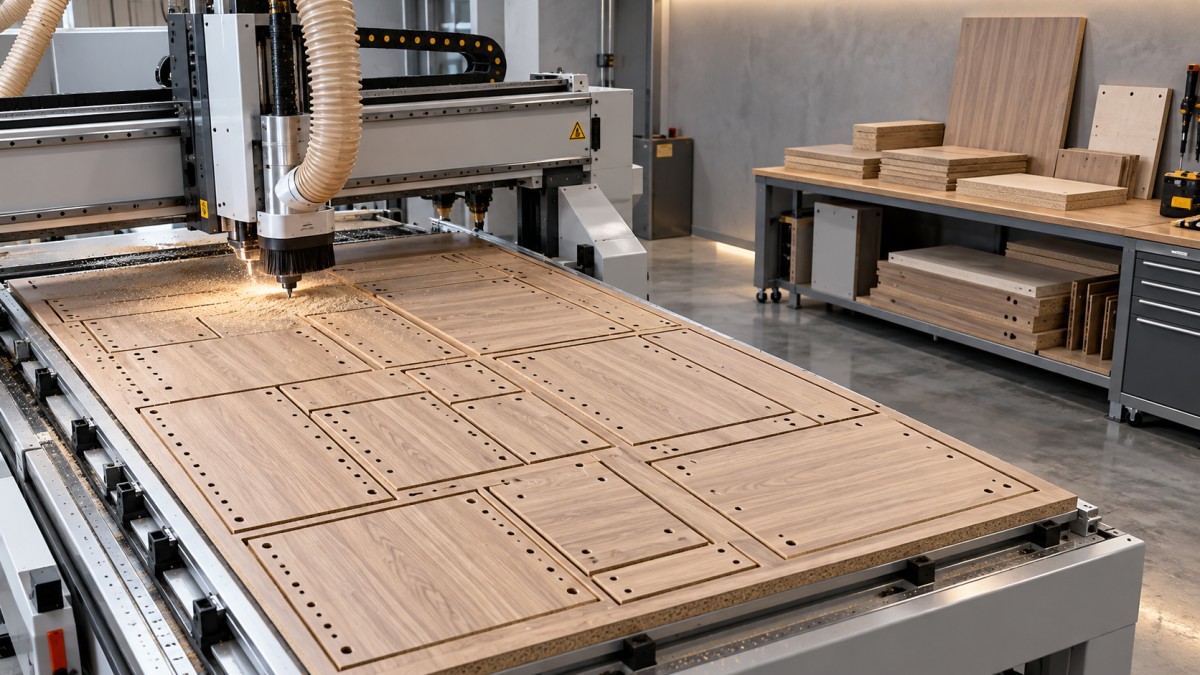
On the shop floor, an operator or loading system places a sheet on the router. Vacuum holds it against the machine bed while the spindle cuts profiles and, where the machine is equipped for it, drills holes or routs grooves. Finished parts are identified, removed, and sent to the next operation.
The distinction is important: a nesting layout determines where parts fit; a toolpath determines how the machine actually makes them. A visually efficient layout is not automatically a safe or efficient cutting program.
The design data matters more than the layout suggests
A nesting system cannot correct a cabinet design that was wrong before it arrived. If the wrong panel thickness is assigned, or a left-hand side is treated as a right-hand side, the router can reproduce that error with impressive consistency.
Edge banding is a common example. Depending on the design system and the shop’s conventions, a part may need to be cut smaller than its finished dimension to account for the banding added later. The deduction has to be applied to the correct edges and material. A mismatch between the cabinet software, the part list, and the actual banding specification can leave an entire batch out of tolerance.
Grain direction deserves similar attention. Rotating a rectangular part may improve sheet utilization, but a visible door or end panel can look wrong if its grain runs across the cabinet instead of vertically. Some decorative boards also require matching or sequencing across adjacent parts. That makes the layout less flexible, but the appearance requirement may matter more than the last usable strip of material.
Before releasing a job, a useful check is to trace one representative cabinet through the data: confirm material and thickness, finished and cut dimensions, machining face, hole positions, edge treatments, and part labels. It is easier to find a mirrored panel on screen than after it has been cut and banded.
How nesting software balances yield and production flow
The software places parts within the usable area of each sheet, accounting for constraints such as grain, sheet margins, tool diameter, and spacing between parts. It may also accommodate remnants if the shop records their dimensions and condition accurately enough to reuse them.
A dense nest can reduce board consumption, but yield is only one measure. Consider a custom kitchen with several cabinets made from the same white panel. Mixing parts from different cabinets on one sheet may use less material than nesting each cabinet separately. Yet it can also make sorting and assembly harder if labels are missing or parts are delivered in an inconvenient order.
The best choice depends on the bottleneck. A shop paying a premium for decorative sheet stock may favor tighter layouts. A shop with limited sorting space may accept a little more offcut to keep cabinet sets together. Tracking usable remnants separately from small, impractical scraps also gives a more honest picture of material performance.
Common-line cutting, where suitable adjacent parts share a cut, illustrates the trade-off. It can reduce cutting distance and material lost to the tool path, but it gives the programmer less freedom to control individual contours and part release. Whether it is appropriate depends on the geometry, cutter, accuracy requirements, and how reliably the parts stay held down.
From toolpaths to clean, stable cuts
Once parts are placed, the program assigns operations: drilling, pocketing, grooving, and profile cutting. Internal features are generally machined before a part is cut free, because the surrounding sheet helps keep it stable. The sequence of outside cuts also affects when vacuum holding area is lost.
Tool choice is a compromise between edge quality, cutting load, and productivity. A compression-style cutter is commonly used for laminated panels because its cutting geometry can help protect both faces when used correctly. The result still depends on material, tool condition, cutting depth, feed, spindle speed, and extraction. A worn cutter or poor settings can chip a surface even when the nest itself is correct.
Holding small parts is often harder than holding large cabinet sides. As the sheet is cut apart, air can leak through open kerfs and reduce the available vacuum. Small or narrow pieces have less area for the vacuum to act on and may move before the final cut is complete. If that happens, dimensional accuracy is not the only concern: a loose piece can damage the cutter or become a safety hazard.
Depending on the machine and job, programmers may adjust the cutting sequence, leave tabs, use an onion-skin approach that retains a thin layer until a final pass, or avoid nesting certain small parts altogether. Each option has a cost. Tabs and skins may require extra cleanup, while additional passes take time. There is no setting that makes every small component easy to run.
The spoilboard matters too. It must be suitable for the vacuum system, flat enough for consistent cutting depth, and maintained as it wears. Cutting too deeply into it accelerates wear and can increase leakage; cutting too shallowly can leave parts connected to the sheet. Dust extraction also needs attention: chips left in the cut can impair the finish and interfere with machining.
What a nesting router can—and cannot—finish
Many cabinet parts can be cut, face-drilled, and grooved in one setup on a flat-table nesting router. That makes the process attractive for work with many different panel sizes. It does not mean every operation is automatically completed on the first pass.
A hole in the edge of a panel, for example, generally needs an appropriate horizontal drilling capability or a separate operation. Machining on the opposite face may require the part to be flipped and accurately registered. Some machines have additional equipment or automation to address these tasks, but capabilities vary; a cabinet design should not assume an operation exists simply because the machine is described as a CNC router.
Labels bridge the gap between machining and the rest of production. A useful label identifies the job and part, and can also show orientation or banded edges. Some systems apply labels before cutting; others do so afterward. Either way, the label must remain readable and attached through handling, edge banding, drilling, and assembly.
Edge banding is its own process, not a cosmetic footnote. A clean, dimensionally consistent routed edge helps the bander apply an even bond. Panel material, adhesive, banding thickness, machine settings, and the intended service conditions all influence the result. Sealed edges can limit exposure of the core, but banding should not be treated as a guarantee of waterproofing or a substitute for assessing the emissions of the complete product.
Nesting versus a beam saw: the practical trade-off
For a shop making many one-off cabinets, a nesting router can combine profiling and some machining while changing between part sizes without a traditional saw setup for each pattern. It is particularly useful when irregular shapes, cutouts, and changing orders are part of ordinary production.
A beam saw may be a better fit for high volumes of rectangular parts, especially where sheets can be cut in stacks and downstream drilling is already well organized. Some factories use both: the saw handles suitable repetitive work, while the router takes on custom shapes and jobs that benefit from integrated machining.
The comparison should cover more than cutting time. Include programming, loading, labeling, sorting, secondary drilling, edge banding, remnant handling, and the space between machines. A router that finishes a sheet quickly can still leave a queue at the bander, just as a high-yield nest can create an expensive sorting problem.
Where to look when results fall short
When parts chip, move, or arrive at assembly in the wrong order, the nesting algorithm is only one possible cause. Check the source data, the post-processed program, the physical sheet, and the machine setup as a connected chain. A correct drawing cannot compensate for an incorrectly defined tool; strong vacuum cannot fix a mirrored machining pattern.
That connected view is central to PWFS’s coverage of woodworking equipment and production systems. For a shop evaluating its own process, a sensible next step is to follow a typical job from design release to assembly, recording where parts wait, require rework, or lose their identity. Those observations will often reveal whether the priority is a better nest, a tooling change, more reliable data, or simply a better handoff to the next machine.
Related News
Get weekly intelligence in your inbox.
No noise. No sponsored content. Pure intelligence.