
Common Problems in Woodworking Automation and How to Fix Bottlenecks on the Line
Common Problems in Woodworking Automation and How to Fix Bottlenecks on the Line
Woodworking automation promises faster throughput, tighter tolerances, and lower labor dependency.
Yet many lines still lose output through hidden constraints.
Some problems look mechanical at first.
In reality, they often come from planning gaps, software mismatch, weak material flow, or poor data visibility.
That is why woodworking automation projects can feel successful on paper but disappointing on the shop floor.
The good news is that most bottlenecks are fixable.
The key is to find the real source of lost capacity before adding more machines.
Where Woodworking Automation Bottlenecks Usually Start
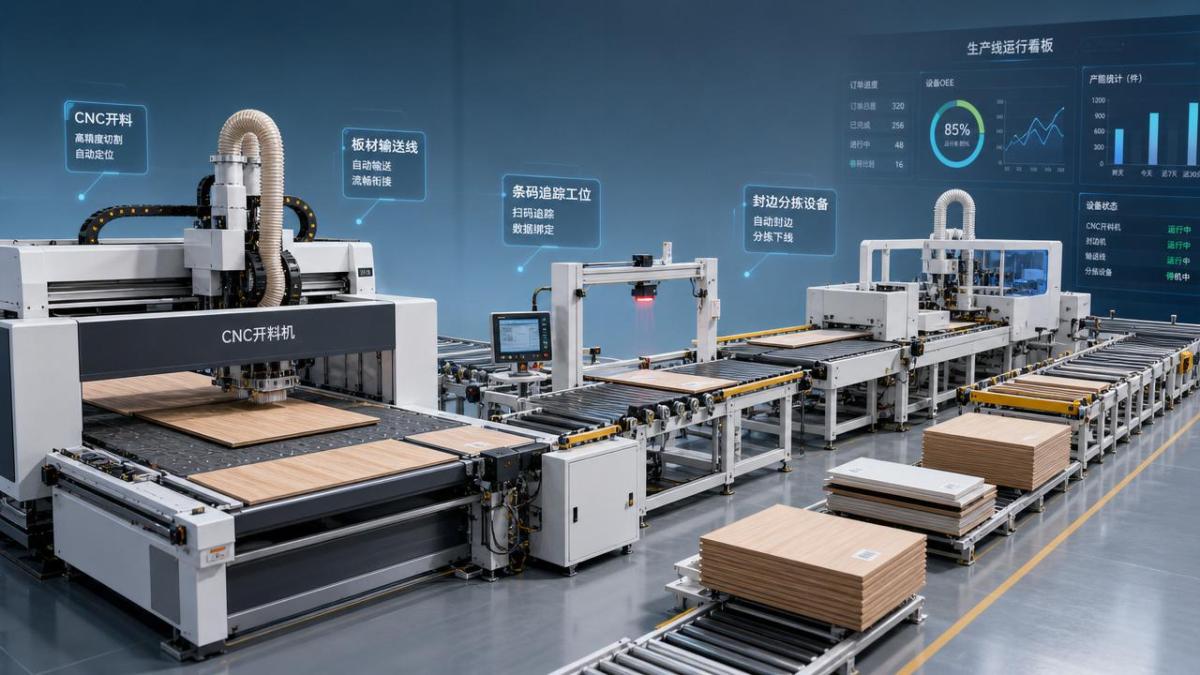
Most woodworking automation bottlenecks begin between processes, not inside one machine.
A CNC router may cut fast, while labeling, sorting, or edge preparation slows everything down.
This creates an unbalanced line.
As buffers fill up, operators start making manual adjustments.
Then the value of woodworking automation drops quickly.
A practical first step is to map the full board journey.
Track loading, nesting, cutting, drilling, labeling, edge banding, sorting, and packing as one connected flow.
Once that flow is visible, the weak link usually becomes obvious.
Common early warning signs
- Frequent stops between CNC cutting and downstream handling.
- High machine utilization with low daily shipment volume.
- Large WIP piles near transfer points.
- Operators waiting for labels, programs, or board identification.
- Repeat rework caused by wrong part sequence.
Material Flow Problems That Slow the Entire Line
In many woodworking automation setups, material flow is the real bottleneck.
Boards arrive late, enter in the wrong order, or wait too long before the next step.
That hurts both speed and traceability.
This is especially common in whole-house customization.
Small batch orders create more SKU variation and more routing complexity.
One missing panel can delay an entire order set.
How to fix it
- Standardize board input sequence by order priority, not by operator convenience.
- Use barcode or RFID tracking from cutting to packing.
- Create controlled buffers between high-speed and variable-speed processes.
- Separate rush orders from normal flow to avoid constant schedule disruption.
- Review conveyor, lift, and return paths for unnecessary handling loops.
These changes sound basic.
Still, they often unlock more output than adding another cutting center.
In woodworking automation, smooth movement is just as important as fast machining.
Software Integration Gaps in Woodworking Automation
Another major issue is software fragmentation.
Design software, MES, nesting tools, CNC controllers, and labeling systems may all work well alone.
But if data handoff is weak, woodworking automation becomes unstable.
Part IDs may change.
Programs may load late.
Labels may print with missing attributes.
When this happens, people step in manually, and errors multiply.
What strong integration should include
- One master part ID across design, production, and packaging.
- Automatic program release based on order status.
- Real-time feedback from machine controllers to MES.
- Exception alerts for missing data or wrong version files.
- Digital confirmation before a part enters the next process.
From a project standpoint, this matters early.
Do not wait until installation is complete to define data logic.
The most reliable woodworking automation projects treat software flow like mechanical layout.
Both need engineering discipline.
Machine Utilization Looks High, But Output Stays Low
This is a classic woodworking automation trap.
A machine can show strong utilization while the line still underperforms.
Why does this happen?
Because utilization does not equal productive flow.
Frequent tool changes, micro-stops, repeated scans, and small waiting periods quietly eat capacity.
More importantly, local optimization can hurt the whole line.
A better way to measure line health
In short, manage the line as a system.
That mindset is essential for any woodworking automation upgrade.
Dust, Tool Wear, and Maintenance Delays
Not every woodworking automation problem starts with controls or scheduling.
Physical conditions still matter a lot.
Dust extraction weakness, worn tools, and delayed maintenance can reduce cut quality and increase stoppages.
The effect is gradual, so teams often normalize the loss.
Then output suddenly falls below target.
Practical fixes with fast payback
- Set tool life rules by material type, not only by operating hours.
- Monitor spindle load and cut quality together.
- Audit dust extraction performance at peak production, not during idle checks.
- Plan maintenance windows around order waves.
- Keep critical spare parts near the line, not in a remote store.
This also supports better safety and more stable quality.
For woodworking automation, uptime and process consistency usually improve together.
Operator Interaction Still Shapes Automation Results
Even advanced woodworking automation depends on human decisions.
If screen logic is confusing, alarms are unclear, or recovery steps are too complex, downtime gets longer.
This becomes more obvious during shift changes or new product launches.
A highly automated line should reduce decision stress, not move it to another place.
Focus areas for smoother operation
- Simplify alarm priorities and define standard response paths.
- Train operators on line logic, not only machine buttons.
- Use digital work instructions for special orders and exceptions.
- Review restart procedures after jams or label errors.
In actual production, simple recovery often matters more than fancy automation features.
That is one of the most overlooked lessons in woodworking automation.
How to Prioritize Fixes Without Disrupting Output
The best improvement plan is not the biggest one.
It is the one that removes the tightest constraint first.
Start with measurable bottlenecks.
Then test low-risk corrections before making large capital decisions.
This approach protects output while building confidence across teams.
A practical sequence
- Measure real line flow for one full order cycle.
- Identify the single biggest delay source.
- Fix process logic before buying more equipment.
- Validate gains with throughput, WIP, and rework data.
- Scale the solution across similar cells or shifts.
For factories moving toward digital and flexible manufacturing, this is the smarter path.
Woodworking automation delivers the best returns when mechanics, software, material flow, and people are aligned.
If the line feels slower than its design speed, look for the hidden handoff, not just the obvious machine.
That is usually where the next productivity gain is waiting.
Related News
Get weekly intelligence in your inbox.
No noise. No sponsored content. Pure intelligence.
